 |
PureText 6.2 |
PureText is a tiny tray utility that removes all text formatting from your clipboard and optionally pastes
the resulting pure text to the active window with a single hotkey.
Have you ever copied some text from a web page or Word document, and wanted to paste it as plain text into
another application without getting all the formatting from the original source? PureText makes this simple.
Just copy/cut whatever you want to the clipboard, click on the PureText tray icon, and then paste to any
application. Better yet, you can configure a PureText Hotkey to convert and paste the text for you. The
pasted text will be pure and free from all formatting.
After running PureText, you will see a "PT" icon appear near the clock on your task bar.
You can click on this icon to remove formatting from the text that is currently on the clipboard. You can
right-click on the icon to display a menu with more options.

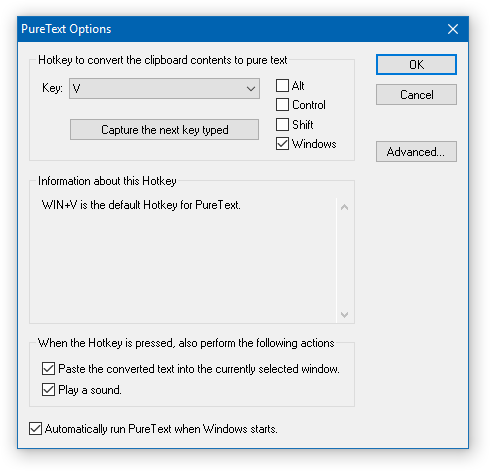
The easiest way to use PureText is to simply use its Hotkey to paste text instead of using the standard
CTRL+V Hotkey that is built into most Windows applications. To configure PureText, right-click on its tray
icon and choose "Options" from the pop-up menu. The default Hotkey is WINDOWS+V, but this can be
changed. In this Options window, you can also configure PureText to run each time you start Windows.
What PureText Will and Will Not Do
PureText only removes rich formatting from text. This includes the font face, font style (bold, italics, etc.),
font color, paragraph styles (left/right/center aligned), margins, character spacing, bullets, subscript, superscript,
tables, charts, pictures, embedded objects, etc. However, it does not modify the actual text. It will not remove or
fix new-lines, carriage returns, tabs, or other white-space. It will not fix word-wrap or clean up your paragraphs.
If you copy the source code of a web page to the clipboard, it is not going to remove all the HTML tags. If you copy
text from an actual web page (not the source of the page), it will remove the formatting.
PureText is equivalent to opening Notepad, doing a PASTE, followed by a SELECT-ALL, and then a COPY.
The benefit of PureText is performing all these actions with a single Hotkey and having the result pasted into the
current window automatically.
New! PureText is now in the Windows Store
If you are running a recent version of Windows 10 (version 1607 or later), you can now install PureText directly from the Windows Store.
It's the same great PureText, but the Store provides a simple install, uninstall, and automatic updates to new versions of PureText in the future.
If you are running an earlier version of Windows or would prefer to manually install PureText, the following are for you.
The above two links are ZIP files that contain a single PureText.exe file. There is no setup program.
You can save PureText.exe anywhere you wish (Program Files, My Documents, some utilities folder, etc.) and then just
double-click on it to run it. After running PureText.exe, you will see a "PT" icon appear near the clock
on your task bar. You can right-click on the icon to display a menu with more options.
If you wish to ever uninstall PureText, first make sure PureText is not running. If you see the "PT"
icon on your Windows task bar, just right-click on it and choose "Exit". Once PureText has exited, simply
delete PureText.exe to complete the uninstall.
What is new in version 6.2 (2018-03-01)
- Added support for Windows Store. If you are on Windows 10 (version 1607 or newer), you can now install, uninstall, and automatically get updates for PureText from the Store.
- Added some warning dialogs if PureText is already running. This can help resolve some confusion if you have multiple versions of PureText on your computer.
- Localization file can reside in the app directory, the user's local app data directory, or the system's app data directory. This is needed to support Window Store installs that don't allow access to the app directory.
What was new in version 6.1 (2017-10-21)
- Fixed an issue that caused PureText to periodically hang for several seconds.
What was new in version 6.0 (2017-10-17)
- Fixed pasting issue with Windows 10 version 1709 (2017 "Fall Creators Update"). If your Hotkey contains the WINDOWS key and you are pasting to Windows 10 1709, you need to release the Hotkey before the paste will occur.
- Added an Advanced button to the Options dialog, which will display another dialog with some more advanced options.
- Added an advanced option to use a new experimental paste method. It is still in testing, but allows PureText to paste without needing to release the Hotkey first on Windows 10 version 1709 or later.
- Added an advanced option to periodically reset the Hotkey detection. This is only for people who find that PureText stops responding to their Hotkey after some time. It is a rare issue that happens on very slow computers or in conjunction with other software that cause Hotkey issues.
What was new in version 5.0 (2017-02-27)
- Fixed pasting issue with Chrome (version 50 and newer). If your Hotkey contains the WINDOWS key and you are pasting to Chrome, you need to release the Hotkey before the paste will occur.
- Fixed issue where /S option wouldn't play sound.
- Added Welcome dialog on first run to explain how to use PureText.
- Added /L option to allow for localization of PureText to other languages. It will generate a PureText.loc file with instructions on how to use it.
- Using a new signing certificate for PureText.exe.
What was new in version 4.0 (2015-11-15)
- Pasting now happens when you press your Hotkey instead of releasing it. You can also press-and-hold your Hotkey to perform multiple pastes.
- Added Hotkey information to PureText's option dialog, which provides details about known Hotkeys and possible conflicts when picking a specific Hotkey.
- Fixed issue where PureText would sometimes stop working after pressing Win+L or Ctrl+Alt+Delete.
- More Hotkey combinations are supported and a few problematic Hotkeys have been blocked.
- PureText will now warn you if you are running PureText.exe from a temporary folder or if PureText.exe is marked as 'blocked'. These can happen when PureText.exe is ran directly from the zip file that is downloaded from the internet.
- PureText.exe is now digitally signed with my publisher certificate, which makes Windows and some virus protection programs happier.
- Fixed some pasting issues with Firefox and Thunderbird on Windows XP.
- Added /N startup option to start with no icon.
- Added /U startup option to uninstall registry entries.
What was new in version 3.0 (2013-01-04)
- Fixed issue that prevented many Hotkeys from working on Windows 8. You can once again use WINDOWS+V and many other Hotkey combinations.
- Fixed pasting issue with Firefox 17, Thunderbird 17, and other Mozilla products.
- Added support for using the ALT key in Hotkeys.
- Adding a Windows 64-bit version of PureText for the first time.
What was new in version 2.0 (2003-08-21)
- Added Unicode support when running on Windows NT/2K/XP/2003/Vista/7/8.
- Added an option to play a sound when the Hotkey is pressed.
- Added option to have PureText start each time you log on to Windows.
- Updated dialogs to use new XP look when running on XP and beyond.
- Added command line options to allow PureText to convert the clipboard contents to pure text, optionally perform a paste and play a sound, and then immediately exit. Run "PureText.exe /?" for command line help.
- Changed the default Hotkey to WINDOWS+V.
- Removed the ability to create Hotkeys that include the ALT key, as the ALT key prevents the Paste feature from working.
- Fixed some issues with the Hotkey capture dialog.
- Blocked all Hotkeys that contain CTRL+V, as they cause problems with the Paste feature.
- Fixed an issue that only allowed up to 30,000 characters to be converted.
- Reworded key names in Options dialog.
- Updated icon.
What was new in Version 1.2 (2002)
- Added feature to optionally perform a paste when Hotkey is pressed.
What was new in Version 1.1 (2002)
- Added Hotkey to convert the clipboard to pure text.
What was in Version 1.0 (2001)
- Just a tray icon you could click on to convert the clipboard to pure text.
PureText is completely free to use. You may not profit from the distribution of it, nor may you
bundle it with another product. If you would like to link to PureText, please do so by linking to this page
(http://SteveMiller.net/PureText)
Home | Applications | Email | Copyright © Steve P. Miller

